Celia Garcia Marquez
January 21, 2021
Mezzanine: Despliegue CMS Django
Warning: This information may be outdated. Please note the date of the post.
Objetivo:
En este post vamos a trabajar sobre el entorno de trabajo de openstack nuevamente, el mismo sobre el que tratamos en el blog.
La máquina virtual sobre la que trabajamos es un Centos 8, nuestro llamado Quijote.
El objetivo es desplegar un CMS python, en este caso mezzanine, basado en django.
1. Instalación de mezzanine.
Entorno de desarrollo: Creación del entorno virtual.
- Primero tendremos que crear un entorno virtual en nuestra máquina anfitriona.
Instalación y configuracion de Mezzanine
- Dentro del entorno virtual instalaremos el cms mezzanine
pip install mezzanine
- Creamos el sitio. En su interior podemos ver que se han creado varios ficheros.
(mezzanine) celiagm@debian:~/venv/mezzanine$ mezzanine-project mezzanine_app
(mezzanine) celiagm@debian:~/venv/mezzanine$ ls
bin  include  lib  lib64  mezzanine_app  pyvenv.cfg  share
- Ahora vamos a crear la base de datos que va a usar la aplicación
(mezzanine) celiagm@debian:~/venv/mezzanine/mezzanine_app$ python3 manage.py createdb
- Además te pedirá las credenciales que vas a usar para administrar el sitio web
A site record is required.
Please enter the domain and optional port in the format 'domain:port'.
For example 'localhost:8000' or 'www.example.com'.
Hit enter to use the default (127.0.0.1:8000):

Creating default site record: 127.0.0.1:8000 ...


Creating default account ...

Username (leave blank to use 'celiagm'): mezzanine
Email address: cgarmai95@gmail.com
Password:
Password (again):
Superuser created successfully.
- Una vez acabado vamos a ejecutar la aplicación
(mezzanine) celiagm@debian:~/venv/mezzanine/mezzanine_app$ python3 manage.py runserver
              .....
          _d^^^^^^^^^b_
       .d''           ``b.
     .p'                `q.
    .d'                   `b.
   .d'                     `b.   * Mezzanine 4.3.1
   ::                       ::   * Django 1.11.29
  ::    M E Z Z A N I N E    ::  * Python 3.7.3
   ::                       ::   * SQLite 3.27.2
   `p.                     .q'   * Linux 4.19.0-13-amd64
    `p.                   .q'
     `b.                 .d'
       `q..          ..p'
          ^q........p^
              ''''

Performing system checks...

System check identified no issues (0 silenced).
February 20, 2021 - 17:20:53
Django version 1.11.29, using settings 'mezzanine_app.settings'
Starting development server at http://127.0.0.1:8000/
Quit the server with CONTROL-C.
- Comprobamos en el navegador con la URL http://127.0.0.1:8000/ que podemos acceder al sitio
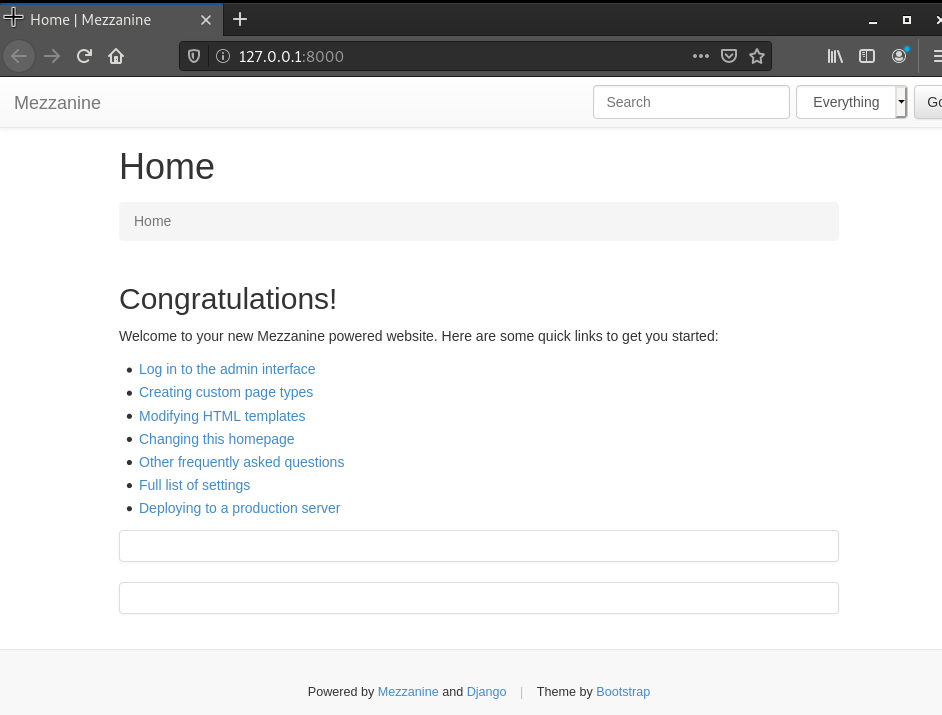
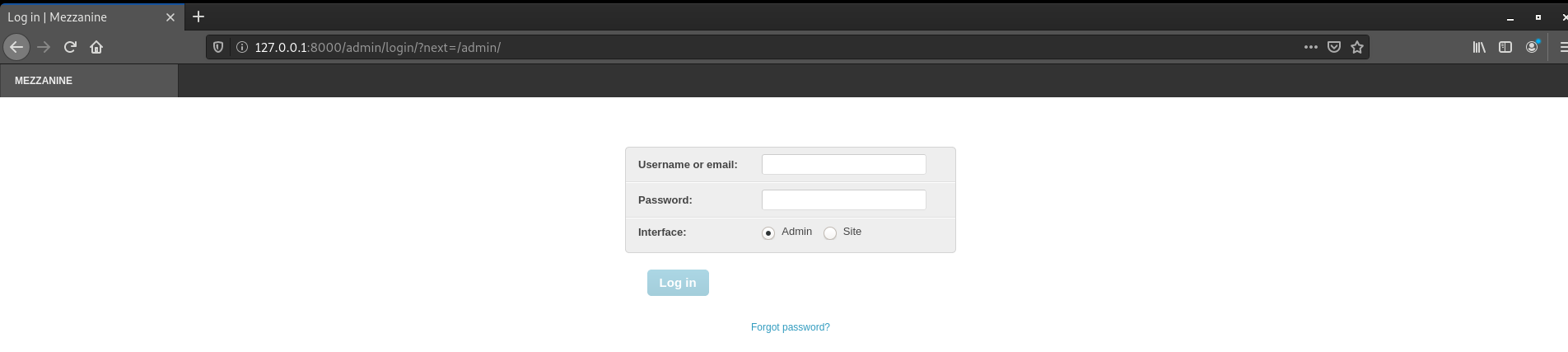
- Entramos en el primer enlace que nos muestran las credenciales para logearnos como administradores del sitio.
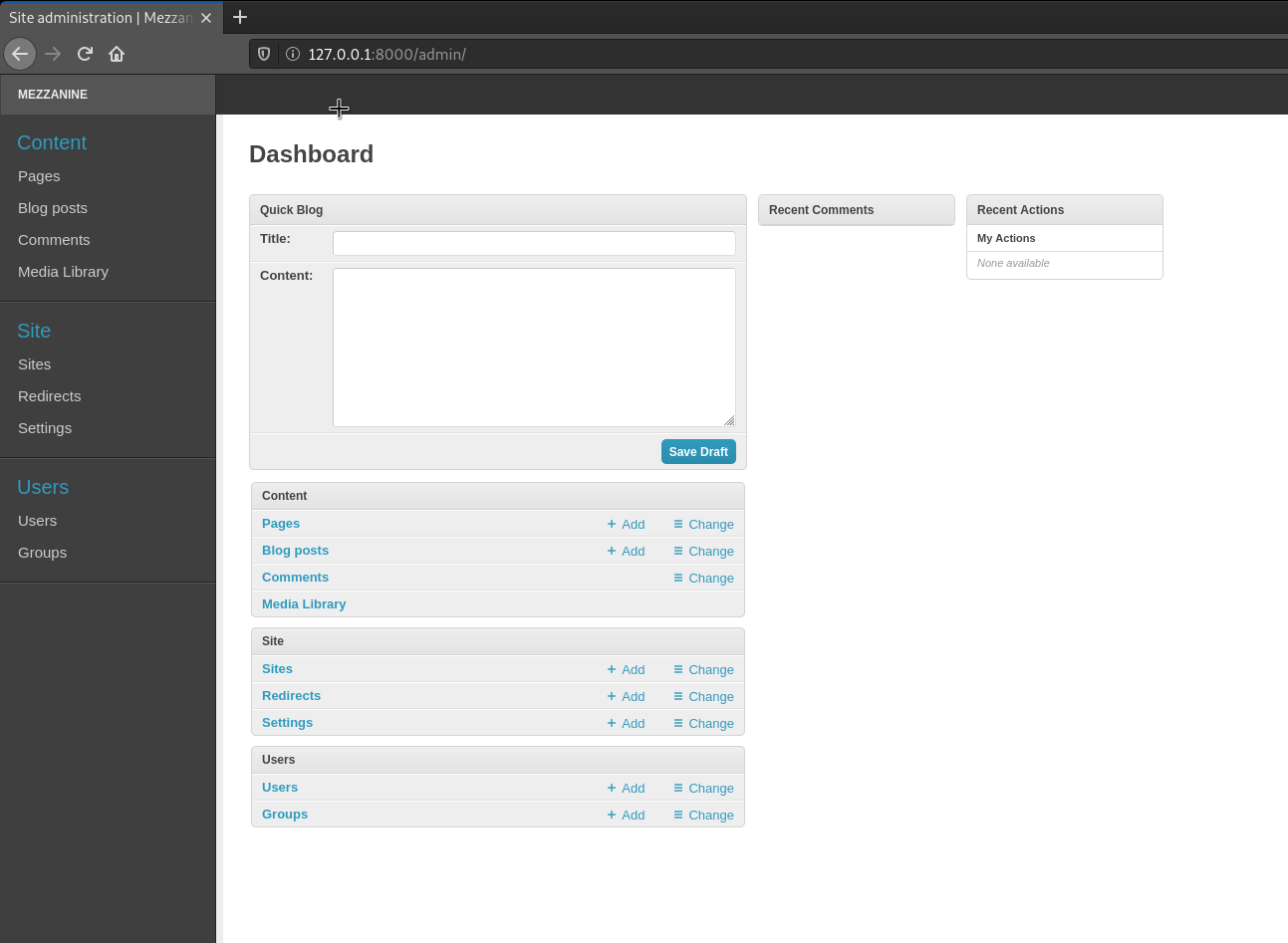
- Una vez indicadas las credenciales, veremos a continuación el sitio de administración para nuestro CMS.
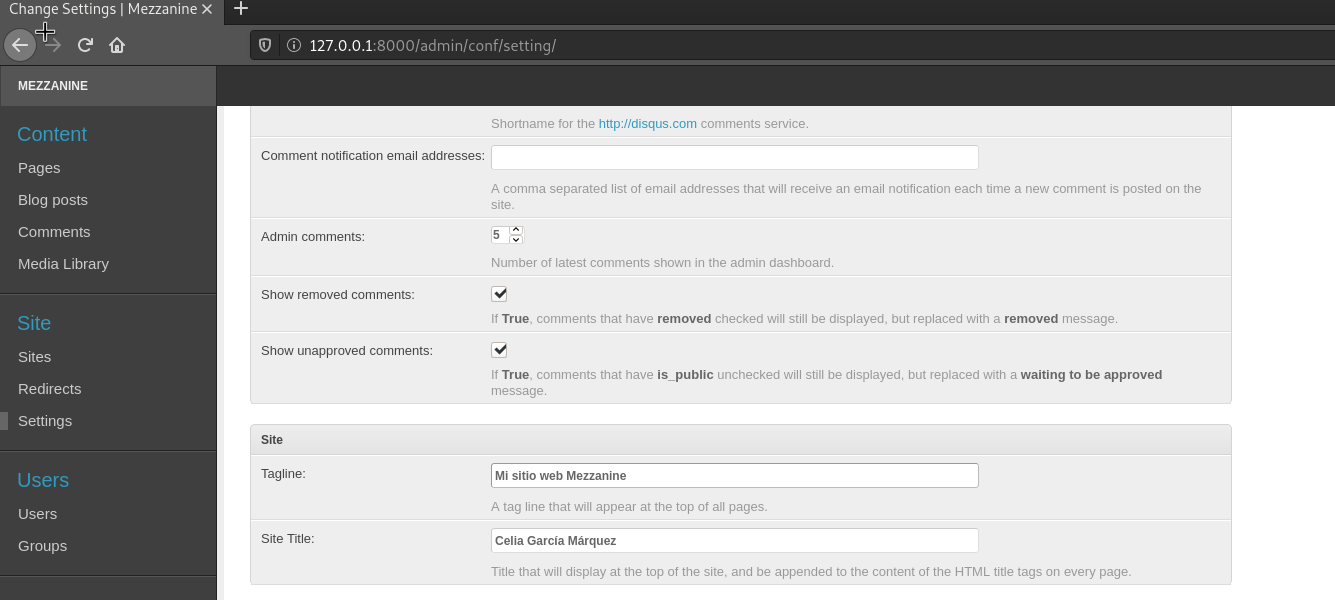
- En el panel izquierdo, Vamos al apartado ‘Settings’ y ahí bajamos hasta encontrar el despliegue ‘Site’ que será donde pongamos nuestro nombre para el sitio web, de manera que se mostrará en la página de inicio del sitio.
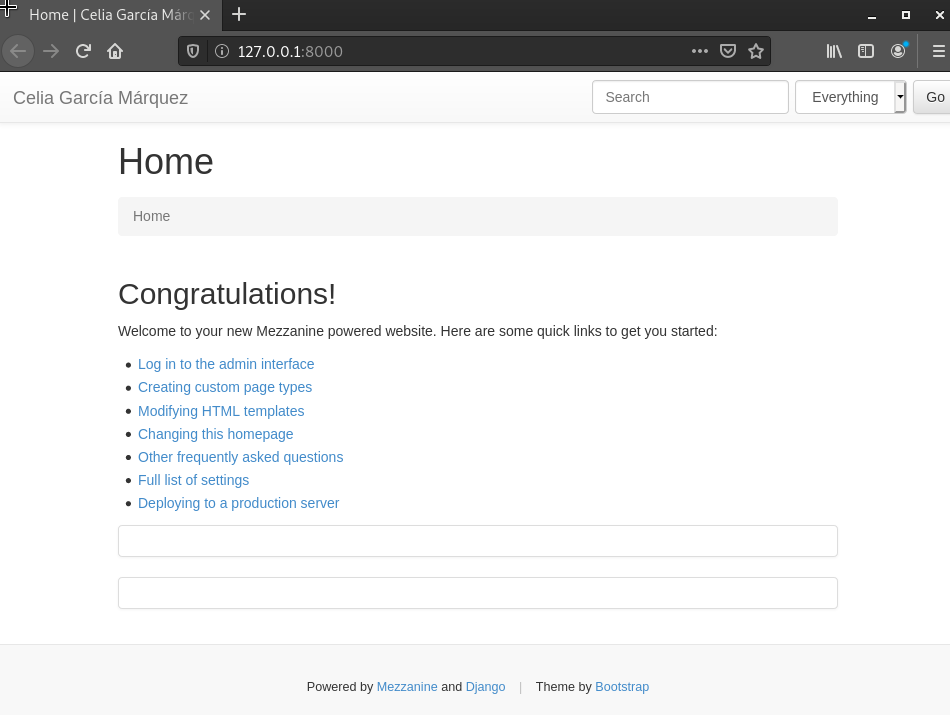
- Podemos comprobar que ya nos muestra nuestro nombre en la página de inicio
2. Personalización del Sitio Web
- Podemos cargar plantillas de Mezzanine con el siguiente comando
(mezzanine) celiagm@debian:~/venv/mezzanine/mezzanine_app$ python manage.py collecttemplates

Copied 47 templates
- Vamos a crear un directorio llamado ’theme’ para usar usar un tema propio, dentro de la app ejecutamos el siguiente comando
python3 manage.py startapp theme
Copiamos la carpeta ’templates’ a theme
Veremos el siguiente contenido
(mezzanine) celiagm@debian:~/venv/mezzanine/mezzanine_app$ ls
deploy  dev.db  fabfile.py  manage.py  mezzanine_app  requirements.txt  static  theme
(mezzanine) celiagm@debian:~/venv/mezzanine/mezzanine_app$ cd theme
(mezzanine) celiagm@debian:~/venv/mezzanine/mezzanine_app/theme$ ls
admin.py  __init__.py  models.py    static     tests.py
apps.py   migrations   __pycache__  templates  views.py
- Dentro de la carpeta theme, creamos unos directorios para nuestros elementos estáticos. Aquí después añadiré una foto de mi avatar para que se muestre en la página principal
mkdir templates -p ./static/img
- Ademas vamos a copiar la base.html y la página de inicio a nuestro directorio donde vamos a modificarla
 cp base.html ../theme/templates/base.html
 cp index.html ../theme/templates/index.html
Se pueden modificar a su antojo dependiendo de los conocimientos que se tengan con html5 y css
Para que los cambios supongan efecto hay que añadir ’theme’ que es nuestro directorio para personalizar el sitio, a installed apps en el fichero ‘settings.py’ de nuestra app
...

################
# APPLICATIONS #
################

INSTALLED_APPS = (
    'theme',
    "django.contrib.admin",
    "django.contrib.auth",
    "django.contrib.contenttypes",
    "django.contrib.redirects",
    "django.contrib.sessions",
    "django.contrib.sites",
    "django.contrib.sitemaps",
    "django.contrib.staticfiles",
    "mezzanine.boot",
    "mezzanine.conf",
    "mezzanine.core",
    "mezzanine.generic",
    "mezzanine.pages",
    "mezzanine.blog",
    "mezzanine.forms",
    "mezzanine.galleries",
    "mezzanine.twitter",
    # "mezzanine.accounts",
)

...
- En la base.html he añadido un formato para nuestro panel de navegación que tendrá una estética simple, en blanco y negro.
<style>
    * {box-sizing: border-box;}
    body {
        margin: 0;
        font-family: Arial, Helvetica, sans-serif;
    }
    .header {
        overflow: hidden;
        background-color: black;
        padding: 20px 10px;
    }
    .header a {
        float: left;
        color: white;
        text-align: center;
        padding: 12px;
        text-decoration: none;
        font-size: 1rem;
        line-height: 25px;
        border-radius: 4px;
    }
    .header a.logo {
        font-size: 1.2rem;
        font-weight: bold;
    }
    .header a:hover {
        background-color: #444;
        color: white;
    }
    .header a.active {
        background-color: white;
        color: black;
    }
    .right {
        float: right;
    }
    @media screen and (max-width: 500px;) {
        .header a {
            float: none;
            display: block;
            text-align: left;
        }
        .right {
            float: none;
        }
    }

</style>
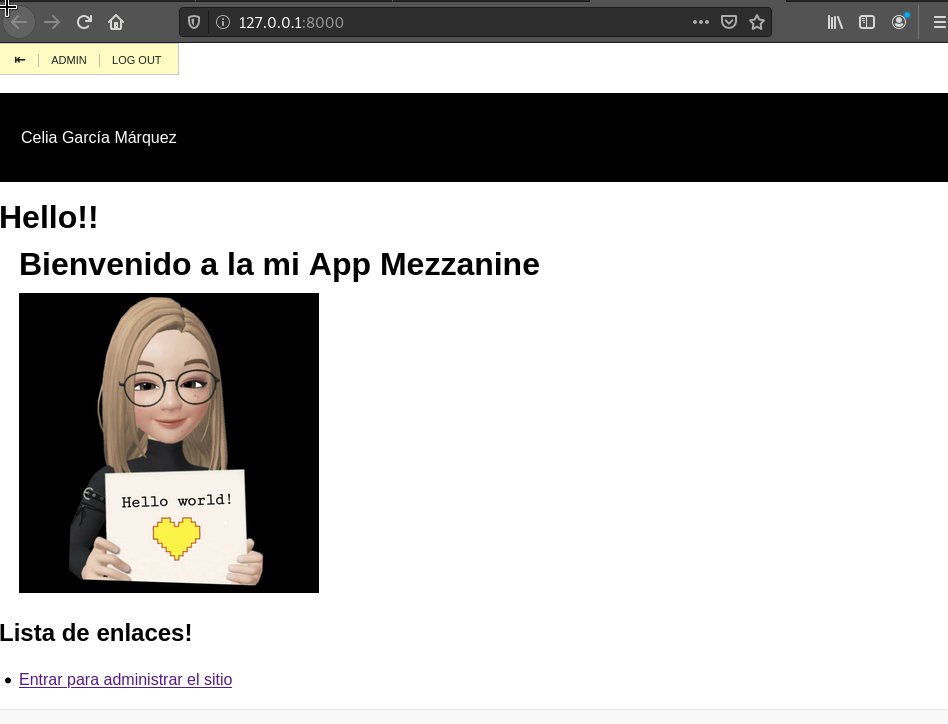
- El index.html tendŕa el siguiente codigo, donde hemos agregado nuestro avatar.
{% extends "base.html" %}
{% load i18n %}

{% block meta_title %}{% trans "Home" %}{% endblock %}
{% block title %}Hello!!{% endblock %}

{% block breadcrumb_menu %}
<h1>Bienvenido a la mi App Mezzanine</h1>
<img src="/static/img/avatar.jpg"
    width="300"
    height="300">
{% endblock %}

{% block main %}
{% blocktrans %}
<h2>Lista de enlaces!</h2>
<ul>
    <li><a href="/admin/">Entrar para administrar el sitio</a></li>
</ul>
{% endblocktrans %}
{% endblock %}
- Si iniciamos la app y entramos al navegador con la url por defecto que adopta nuestro servidor http://127.0.0.1:8000/
3. Copia de seguridad de la base de datos. Repositorio git
Vamos a guardar los ficheros que componen esta aplicación en un repositorio de git y ademas tambien vamos hacer la copia de seguridad de la base de datos y la subiremos al mismo repositorio.
- Creamos un repositorio vacio en el directorio de mezzanine, añadimos todo el contenido y lo subimos al repositorio que tenemos creado en git.
git init
git add *
git commit -m "first commit"
git branch -M main
git remote add origin https://github.com/CeliaGMqrz/mezzanine_app.git
git push -u origin main
- Entramos en el directorio mysite y creamos la copia de seguridad de la base de datos, la añadimos al repositorio y la subimos.
(mezzanine) celiagm@debian:~/venv/mezzanine/mezzanine_app$ python manage.py dumpdata > db_data.json
(mezzanine) celiagm@debian:~/venv/mezzanine/mezzanine_app$ ls
db_data.json  deploy  dev.db  fabfile.py  manage.py  mezzanine_app  requirements.txt  static  theme
(mezzanine) celiagm@debian:~/venv/mezzanine/mezzanine_app$ git add db_data.json
(mezzanine) celiagm@debian:~/venv/mezzanine/mezzanine_app$ git commit -am "añadida db"
(mezzanine) celiagm@debian:~/venv/mezzanine/mezzanine_app$ git push
4. Despliegue de la aplicación (servidor web y base de datos)
4.1 Crear un usuario para la base de datos
En el servidor de base de datos (Sancho), mariadb en Ubuntu, vamos a crear otro usuario para que use la aplicacion de mezzanine en concreto. Además le daremos privilegios para que pueda operar sin problemas con la app.
MariaDB [(none)]> CREATE USER 'mezzanine'@'10.0.2.4' IDENTIFIED BY 'mezzanine';
Query OK, 0 rows affected (0.135 sec)

MariaDB [(none)]> GRANT ALL PRIVILEGES ON *.* TO 'mezzanine'@'10.0.2.4' IDENTIFIED BY 'mezzanine' WITH GRANT OPTION;
Query OK, 0 rows affected (0.010 sec)

MariaDB [(none)]> FLUSH PRIVILEGES;
Query OK, 0 rows affected (0.034 sec)

MariaDB [(none)]> quit
Bye
Nos aseguramos que las bases de datos están accesibles desde todas las máquinas.
sudo nano /etc/mysql/my.cnf
Buscamos la siguiente linea y comprobamos que esta de la siguiente forma
bind-address = 0.0.0.0
4.2. Comprobar la conexión remota de quijote a sancho
- Necesitaremos tener instalado un cliente de mariadb en quijote
sudo dnf install mariadb
- Comprobamos la conexión desde el nuevo usuario ‘mezzanine’
[centos@quijote ~]$ mysql -u mezzanine -p -h bd.celia.gonzalonazareno.org
Enter password:
Welcome to the MariaDB monitor.  Commands end with ; or \g.
Your MariaDB connection id is 111
Server version: 10.4.17-MariaDB-1:10.4.17+maria~focal-log mariadb.org binary distribution

Copyright (c) 2000, 2018, Oracle, MariaDB Corporation Ab and others.

Type 'help;' or '\h' for help. Type '\c' to clear the current input statement.

MariaDB [(none)]> quit
Bye
4.3. Crear la base de datos en Sancho
Necesitamos crear una nueva base de datos en Sancho para poder importar la copia de seguridad de la base de datos del entorno de desarrollo al de producción.
- Crear la nueva base de datos llamada ‘mezzanine’
MariaDB [(none)]> create database mezzanine;
Query OK, 1 row affected (0.008 sec)

MariaDB [(none)]> GRANT ALL PRIVILEGES ON `mezzanine`.* to 'mezzanine'@'10.0.2.4';
Query OK, 0 rows affected (0.006 sec)

MariaDB [(none)]> FLUSH PRIVILEGES;
Query OK, 0 rows affected (0.001 sec)
4.4. Crear entorno virtual e instalar el módulo uwsgi
- Descargamos el paquete necesario para crear el entorno virtual y git para clonar nuestro repositorio. Además instalaremos el módulo wsgi para poder desplegar la app y el compilador.
sudo dnf install git
sudo dnf install python3
sudo dnf install python3-mod_wsgi
sudo dnf install gcc python3-devel
- Clonamos el repositorio en nuestro documenroot
[centos@quijote www]$ sudo git clone https://github.com/CeliaGMqrz/mezzanine_app.git
- Creamos el entorno virtual, lo activamos e instalamos los paquetes que están en el fichero requeriments.txt
[centos@quijote ~]$ python3 -m venv mezzanine
[centos@quijote ~]$ source mezzanine/bin/activate
(mezzanine) [centos@quijote ~]$ pip install -r /var/www/mezzanine_app/requirements.txt
Instalaremos el conector de mysql y uwsgi
pip install uwsgi
pip install mysql-connector-python
4.5. Configuración de la base de datos
- Editamos el fichero de configuración de mezzanine
sudo nano /var/www/mezzanine_app/mezzanine_app/settings.py
- Buscamos la linea donde se define las caracteristicas de la base de datos a ala que se va a conectar y lo reemplazamos segun lo siguiente:
#############
# DATABASES #
#############

DATABASES = {
    "default": {
        # Add "postgresql_psycopg2", "mysql", "sqlite3" or "oracle".
        "ENGINE": "django.db.backends.mysql",
        # DB name or path to database file if using sqlite3.
        "NAME": "mezzanine",
        # Not used with sqlite3.
        "USER": "mezzanine",
        # Not used with sqlite3.
        "PASSWORD": "mezzanine",
        # Set to empty string for localhost. Not used with sqlite3.
        "HOST": "10.0.1.11",
        # Set to empty string for default. Not used with sqlite3.
        "PORT": "",
    }
}
4.6. Restaurar copia de seguridad de la base de datos
Previamente hemos hecho una copia de seguridad de la base de datos proveniente de el entorno de desarrollo y lo hemos subido a nuestro git.
Ahora vamos a cargar los datos de esa copia de seguridad para importarlos en la nueva base de datos de mysql.
- Lo haremos desde el entorno virtual
!!!! Errores que pueden surgir
- No encuentra la clave secreta
    raise ImproperlyConfigured("The SECRET_KEY setting must not be empty.")
django.core.exceptions.ImproperlyConfigured: The SECRET_KEY setting must not be empty.
Este error se puede deber por muchas causas, puede que la versión de python que estemos usando en el entorno de desarrollo y en el entorno de producción no sean la misma y crea conflicto. En este caso he descargado la versión correspondiente e instalado para que las dos tengan la misma version en ambos entornos, usando pues la python3.7.3. Además he tenido que compilar el programa ya que la máquina Centos del cloud no deja actualizar paquetes. El motivo por el que no deja actualizar paquetes se debe a que hay que subcribirse y pagar.
Puede deberse a que una parte del programa no se está ejecutando correctamente y esté haciendo referencia a una clave que existía en el entorno de desarrollo que ahora no existe en el de producción. Para omitir este problema, que no es solucionarlo de buen manera, podemos comentar las líneas que por defecto se encuentran en el siguiente directorio de nuestro virtualvenv.
sudo nano /home/centos/mezzanine/lib/python3.7/site-packages/django/conf/__init__.py
       # if not self.SECRET_KEY:
       #     raise ImproperlyConfigured("The SECRET_KEY setting must not be empty.")
Así no nos daría la excepción. Aunque no es la manera adecuada de solucionarlo.
- No encuentra el módulo de mysql
django.core.exceptions.ImproperlyConfigured: Error loading MySQLdb module: No module named 'MySQLdb'.
Did you install mysqlclient or MySQL-python?
Para solucionarlo lo que hemos hecho es instalar el siguiente paquete y añadir al fichero init.py_ de nuestro proyecto lo siguiente
(mezzanine) [centos@quijote mezzanine_app]$ pip install pymysql
Collecting pymysql
  Using cached PyMySQL-1.0.2-py3-none-any.whl (43 kB)
Installing collected packages: pymysql
Successfully installed pymysql-1.0.2

(mezzanine) [centos@quijote mezzanine_app]$ sudo nano mezzanine_app/__init__.py
import pymysql
pymysql.install_as_MySQLdb()
- Ahora ya podemos hacer el migrate
(mezzanine) [centos@quijote mezzanine_app]$ python3.7 manage.py migrate
/home/centos/mezzanine/lib/python3.7/site-packages/mezzanine/utils/conf.py:65: UserWarning: You haven't defined the ALLOWED_HOSTS settings, which Django requires. Will fall back to the domains configured as sites.
  warn("You haven't defined the ALLOWED_HOSTS settings, which "
Operations to perform:
  Apply all migrations: admin, auth, blog, conf, contenttypes, core, django_comments, forms, galleries, generic, pages, redirects, sessions, sites, twitter
Running migrations:
  Applying contenttypes.0001_initial... OK
  Applying auth.0001_initial... OK
  Applying admin.0001_initial... OK
  Applying admin.0002_logentry_remove_auto_add... OK
  Applying contenttypes.0002_remove_content_type_name... OK
  Applying auth.0002_alter_permission_name_max_length... OK
  Applying auth.0003_alter_user_email_max_length... OK
  Applying auth.0004_alter_user_username_opts... OK
  Applying auth.0005_alter_user_last_login_null... OK
  Applying auth.0006_require_contenttypes_0002... OK
  Applying auth.0007_alter_validators_add_error_messages... OK
  Applying auth.0008_alter_user_username_max_length... OK
  Applying sites.0001_initial... OK
  Applying blog.0001_initial... OK
  Applying blog.0002_auto_20150527_1555... OK
  Applying blog.0003_auto_20170411_0504... OK
  Applying conf.0001_initial... OK
  Applying core.0001_initial... OK
  Applying core.0002_auto_20150414_2140... OK
  Applying django_comments.0001_initial... OK
  Applying django_comments.0002_update_user_email_field_length... OK
  Applying django_comments.0003_add_submit_date_index... OK
  Applying pages.0001_initial... OK
  Applying forms.0001_initial... OK
  Applying forms.0002_auto_20141227_0224... OK
  Applying forms.0003_emailfield... OK
  Applying forms.0004_auto_20150517_0510... OK
  Applying forms.0005_auto_20151026_1600... OK
  Applying forms.0006_auto_20170425_2225... OK
  Applying galleries.0001_initial... OK
  Applying galleries.0002_auto_20141227_0224... OK
  Applying generic.0001_initial... OK
  Applying generic.0002_auto_20141227_0224... OK
  Applying generic.0003_auto_20170411_0504... OK
  Applying pages.0002_auto_20141227_0224... OK
  Applying pages.0003_auto_20150527_1555... OK
  Applying pages.0004_auto_20170411_0504... OK
  Applying redirects.0001_initial... OK
  Applying sessions.0001_initial... OK
  Applying sites.0002_alter_domain_unique... OK
  Applying twitter.0001_initial... OK
- Cargamos los datos en la base de datos nueva
(mezzanine) [centos@quijote mezzanine_app]$ python3.7 manage.py loaddata db_data.json
/home/centos/mezzanine/lib/python3.7/site-packages/mezzanine/utils/conf.py:65: UserWarning: You haven't defined the ALLOWED_HOSTS settings, which Django requires. Will fall back to the domains configured as sites.
  warn("You haven't defined the ALLOWED_HOSTS settings, which "
Installed 153 object(s) from 1 fixture(s)
- Comprobamos, desde Sancho por ejemplo, que estan todas las tablas creadas en la correspondiente base de datos.
ubuntu@sancho:~$ sudo mysql -u root -p
Enter password:
Welcome to the MariaDB monitor.  Commands end with ; or \g.
Your MariaDB connection id is 117
Server version: 10.4.17-MariaDB-1:10.4.17+maria~focal-log mariadb.org binary distribution

Copyright (c) 2000, 2018, Oracle, MariaDB Corporation Ab and others.

Type 'help;' or '\h' for help. Type '\c' to clear the current input statement.

MariaDB [(none)]> use mezzanine
Reading table information for completion of table and column names
You can turn off this feature to get a quicker startup with -A

Database changed
MariaDB [mezzanine]> show tables;
+-----------------------------+
| Tables_in_mezzanine         |
+-----------------------------+
| auth_group                  |
| auth_group_permissions      |
| auth_permission             |
| auth_user                   |
| auth_user_groups            |
| auth_user_user_permissions  |
| blog_blogcategory           |
| blog_blogpost               |
| blog_blogpost_categories    |
| blog_blogpost_related_posts |
| conf_setting                |
| core_sitepermission         |
| core_sitepermission_sites   |
| django_admin_log            |
| django_comment_flags        |
| django_comments             |
| django_content_type         |
| django_migrations           |
| django_redirect             |
| django_session              |
| django_site                 |
| forms_field                 |
| forms_fieldentry            |
| forms_form                  |
| forms_formentry             |
| galleries_gallery           |
| galleries_galleryimage      |
| generic_assignedkeyword     |
| generic_keyword             |
| generic_rating              |
| generic_threadedcomment     |
| pages_link                  |
| pages_page                  |
| pages_richtextpage          |
| twitter_query               |
| twitter_tweet               |
+---------------------------
Configurar el virtualhost
No me voy a detener en la configuración de virtualhost, la información para crear los virtualhosts se refleja también en mi blog. ;)
La configuración es la siguiente:
/etc/httpd/sites-available/python.celia.gonzalonazareno.org
<VirtualHost *:80>
    ServerName python.celia.gonzalonazareno.org
    Redirect permanent / https://python.celia.gonzalonazareno.org
    DocumentRoot /var/www/mezzanine_app
    ErrorLog /var/www/mezzanine_app/log/error.log
    CustomLog /var/www/mezzanine_app/log/requests.log combined

    <Proxy "unix:/run/php-fpm/www.sock|fcgi://php-fpm">
            ProxySet disablereuse=off
    </Proxy>

    <FilesMatch \.php$>
            SetHandler proxy:fcgi://php-fpm
    </FilesMatch>
</VirtualHost>
/etc/httpd/sites-available/https.python.celia.gonzalonazareno.org
<VirtualHost *:443>
    ServerName python.celia.gonzalonazareno.org
    DocumentRoot /var/www/mezzanine_app
    ErrorLog /var/www/mezzanine_app/log/error.log
    CustomLog /var/www/mezzanine_app/log/requests.log combined

        <Proxy "unix:/run/php-fpm/www.sock|fcgi://php-fpm">
                ProxySet disablereuse=off
        </Proxy>

        <FilesMatch \.php$>
                SetHandler proxy:fcgi://php-fpm
        </FilesMatch>

    Alias /static "/var/www/mezzanine_app/theme"

    <Directory /var/www/mezzanine_app/theme">
    Require all granted
    Options FollowSymlinks
    </Directory>
    ProxyPass /static !
    ProxyPass / http://127.0.0.1:8080/

    SSLEngine on
    SSLCertificateFile /etc/pki/tls/certs/wc_celia_sign.crt
    SSLCertificateKeyFile /etc/pki/tls/private/wc_private.key

</VirtualHost>
- Ahora crearemos un fichero .ini para iniciar el proxy con uwsgi
[uwsgi]
http = :8080
chdir = /var/www/mezzanine_app/mezzanine_app
wsgi-file = /var/www/mezzanine_app/mezzanine_app/wsgi.py
master
- Iniciamos el proxy
(mezzanine) [centos@quijote mezzanine_app]$ uwsgi uwsgi.ini
[uWSGI] getting INI configuration from uwsgi.ini
*** Starting uWSGI 2.0.19.1 (64bit) on [Sun Feb 21 18:25:20 2021] ***
compiled with version: 8.3.1 20191121 (Red Hat 8.3.1-5) on 21 February 2021 13:29:33
os: Linux-4.18.0-240.1.1.el8_3.x86_64 #1 SMP Thu Nov 19 17:20:08 UTC 2020
nodename: quijote
machine: x86_64
clock source: unix
detected number of CPU cores: 1
current working directory: /var/www/mezzanine_app
detected binary path: /home/centos/mezzanine/bin/uwsgi
!!! no internal routing support, rebuild with pcre support !!!
chdir() to /var/www/mezzanine_app
your processes number limit is 1647
your memory page size is 4096 bytes
detected max file descriptor number: 1024
lock engine: pthread robust mutexes
thunder lock: disabled (you can enable it with --thunder-lock)
uWSGI http bound on :8080 fd 4
uwsgi socket 0 bound to TCP address 127.0.0.1:33589 (port auto-assigned) fd 3
Python version: 3.7.3 (default, Feb 21 2021, 14:11:31)  [GCC 8.3.1 20191121 (Red Hat 8.3.1-5)]
*** Python threads support is disabled. You can enable it with --enable-threads ***
Python main interpreter initialized at 0x2297e60
your server socket listen backlog is limited to 100 connections
your mercy for graceful operations on workers is 60 seconds
mapped 145840 bytes (142 KB) for 1 cores
*** Operational MODE: single process ***
WSGI app 0 (mountpoint='') ready in 3 seconds on interpreter 0x2297e60 pid: 102191 (default app)
*** uWSGI is running in multiple interpreter mode ***
spawned uWSGI master process (pid: 102191)
spawned uWSGI worker 1 (pid: 102192, cores: 1)
spawned uWSGI http 1 (pid: 102193)
- Tenemos que asegurarnos que el DNS está bien configurado en Freston
. . .
python   IN     CNAME   dulcinea
. . .
Funcionamiento del sitio web