Celia Garcia Marquez
November 19, 2020
Crear Autoridad Certificadora y Certificado autofirmado
Warning: This information may be outdated. Please note the date of the post.
HTTPS / SSL
Tarea 1: Certificado autofirmado
PARTE 1
OBJETIVO:
Crear su autoridad certificadora (generar el certificado digital de la CA). Mostrar el fichero de configuración de la AC.
Conocimientos previos:
OpenSSL permite con una serie de comandos crear una autoridad de certificación o CA en la que los servidores y clientes internos confien. Las funciones de la CA incluyen crear certificados a partir de las solicitudes de los certificados para los servidores y también la revocación y renovación de certificados.
Para usar el protocolo HTTPS en un servidor web es necesario al menos generar un certificado autofirmado que incluya el dominio del sitio web. Ese certificado proporciona comunicaciones seguras entre el servidor y el cliente pero los clientes no lo consideran de confianza de modo que han de omitir la validación del certificado, un entorno de desarrollo o pruebas es suficiente pero en un escenario de producción para añadir más seguridad donde hay varios servidores que además requieren y validan también el certificado del cliente es necesario utilizar certificados generados por una entidad en la que se confíe, esta es la autoridad de certificación.
La autoridad de certificación o CA es una entidad en la que se confía, si una CA ha firmado digitalmente un certificado esta asegura que el certificado pertenece a quien dice pertenecer. Las funciones de una CA son firmar los certificados que se le envían, de revocar los certificados cuando han sido comprometidos o de renovarlos cuando su validez expira.
Crear el directorio donde vamos a alojar los ficheros de la CA y le damos los permisos necesarios
DIR_CA="/root/ca"
mkdir /root/ca
cd /root/ca
mkdir certs csr crl newcerts private
chmod 700 private
touch index.txt
touch index.txt.attr
echo 1000 > serial
Crear las variables de entorno que definiran nuestra CA para el fichero de configuración
countryName_default="ES"
stateOrProvinceName_default="Sevilla"
localityName_default="Los Palacios"
organizationName_default="Celia"
organizationalUnitName_default="cgm"
emailAddress_default="cgarmai95@gmail.com"
Creamos el fichero de configuración
DIR_CA="./"
cat <<EOF>$DIR_CA/openssl.conf
[ ca ]
# man ca
default_ca = CA_default

[ CA_default ]
# Directory and file locations.
dir               = ${DIR_CA}
certs             = ${DIR_CA}certs
crl_dir           = ${DIR_CA}crl
new_certs_dir     = ${DIR_CA}newcerts
database          = ${DIR_CA}index.txt
serial            = ${DIR_CA}serial
RANDFILE          = ${DIR_CA}private/.rand

# The root key and root certificate.
private_key       = ${DIR_CA}private/ca.key.pem
certificate       = ${DIR_CA}certs/ca.cert.pem

# For certificate revocation lists.
crlnumber         = ${DIR_CA}crlnumber
crl               = ${DIR_CA}crl/ca.crl.pem
crl_extensions    = crl_ext
default_crl_days  = 30

# SHA-1 is deprecated, so use SHA-2 instead.
default_md        = sha256

name_opt          = ca_default
cert_opt          = ca_default
default_days      = 375
preserve          = no
policy            = policy_strict

[ policy_strict ]
# The root CA should only sign intermediate certificates that match.
# See the POLICY FORMAT section of man ca.
countryName             = match
stateOrProvinceName     = match
organizationName        = match
organizationalUnitName  = optional
commonName              = supplied
emailAddress            = optional

[ policy_loose ]
# Allow the intermediate CA to sign a more diverse range of certificates.
# See the POLICY FORMAT section of the ca man page.
countryName             = optional
stateOrProvinceName     = optional
localityName            = optional
organizationName        = optional
organizationalUnitName  = optional
commonName              = supplied
emailAddress            = optional

[ req ]
# Options for the req tool (man req).
default_bits        = 2048
distinguished_name  = req_distinguished_name
string_mask         = utf8only
# SHA-1 is deprecated, so use SHA-2 instead.
default_md          = sha256
# Extension to add when the -x509 option is used.
x509_extensions     = v3_ca
# Extension for SANs
req_extensions      = v3_req

[ v3_req ]
# Extensions to add to a certificate request
# Before invoke openssl use: export SAN=DNS:value1,DNS:value2
basicConstraints = CA:FALSE
keyUsage = nonRepudiation, digitalSignature, keyEncipherment
xxxsubjectAltNamexxx =

[ req_distinguished_name ]
# See <https://en.wikipedia.org/wiki/Certificate_signing_request>.
countryName                     = Country Name (2 letter code)
stateOrProvinceName             = State or Province Name
localityName                    = Locality Name
0.organizationName              = Organization Name
organizationalUnitName          = Organizational Unit Name
commonName                      = Common Name
emailAddress                    = Email Address

# Optionally, specify some defaults.
countryName_default             = $countryName_default
stateOrProvinceName_default     = $stateOrProvinceName_default
localityName_default            = $localityName_default
0.organizationName_default      = $organizationName_default
organizationalUnitName_default  = $organizationalUnitName_default
emailAddress_default            = $emailAddress_default

[ v3_ca ]
# Extensions for a typical CA (man x509v3_config).
subjectKeyIdentifier = hash
authorityKeyIdentifier = keyid:always,issuer
basicConstraints = critical, CA:true
keyUsage = critical, digitalSignature, cRLSign, keyCertSign

[ v3_intermediate_ca ]
# Extensions for a typical intermediate CA (man x509v3_config).
subjectKeyIdentifier = hash
authorityKeyIdentifier = keyid:always,issuer
basicConstraints = critical, CA:true, pathlen:0
keyUsage = critical, digitalSignature, cRLSign, keyCertSign

[ usr_cert ]
# Extensions for client certificates (man x509v3_config).
basicConstraints = CA:FALSE
nsCertType = client, email
nsComment = "OpenSSL Generated Client Certificate"
subjectKeyIdentifier = hash
authorityKeyIdentifier = keyid,issuer
keyUsage = critical, nonRepudiation, digitalSignature, keyEncipherment
extendedKeyUsage = clientAuth, emailProtection

[ server_cert ]
# Extensions for server certificates (man x509v3_config).
basicConstraints = CA:FALSE
nsCertType = server
nsComment = "OpenSSL Generated Server Certificate"
subjectKeyIdentifier = hash
authorityKeyIdentifier = keyid,issuer:always
keyUsage = critical, digitalSignature, keyEncipherment
extendedKeyUsage = serverAuth

[ crl_ext ]
# Extension for CRLs (man x509v3_config).
authorityKeyIdentifier=keyid:always

[ ocsp ]
# Extension for OCSP signing certificates (man ocsp).
basicConstraints = CA:FALSE
subjectKeyIdentifier = hash
authorityKeyIdentifier = keyid,issuer
keyUsage = critical, digitalSignature
extendedKeyUsage = critical, OCSPSigning
EOF
sed -i 's|xxxsubjectAltNamexxx =|subjectAltName = ${ENV::SAN}|g' openssl.conf
Creamos la clave y certificado de la autoridad de certificación
Crear clave:
openssl genrsa -aes256 -out private/ca.key.pem 4096
chmod 400 private/ca.key.pem
URL=celiagarcia.iesgn.org
export SAN=DNS:$URL
Crear certificado
openssl req -config openssl.conf -key private/ca.key.pem -new -x509 -days 7300 -sha256 -extensions v3_ca -out certs/ca.cert.pem
root@debian-https:~/ca# openssl req -config openssl.conf -key private/ca.key.pem -new -x509 -days 7300 -sha256 -extensions v3_ca -out certs/ca.cert.pem
Enter pass phrase for private/ca.key.pem:
You are about to be asked to enter information that will be incorporated
into your certificate request.
What you are about to enter is what is called a Distinguished Name or a DN.
There are quite a few fields but you can leave some blank
For some fields there will be a default value,
If you enter '.', the field will be left blank.
-----
Country Name (2 letter code) [ES]:
State or Province Name [Sevilla]:
Locality Name [Los Palacios]:
Organization Name [Celia]:
Organizational Unit Name [cgm]:
Common Name []:
Email Address [cgarmai95@gmail.com]:
Le damos los permisos necesarios.
chmod 444 certs/ca.cert.pem
Estructura de directorios
root@debian-https:~/ca# tree
.
├── certs
│   └── ca.cert.pem
├── crl
├── csr
│   ├── celia.iesgn.org.csr
│   └── jonathan.iesgn.org.csr
├── index.txt
├── index.txt.attr
├── newcerts
├── openssl.conf
├── private
│   ├── ca.key.pem
│   └── celia.iesgn.org.key.pem
└── serial
Fichero de configuración (openssl.conf)
[ ca ]
# man ca
default_ca = CA_default

[ CA_default ]
# Directory and file locations.
dir               = ./
certs             = ./certs
crl_dir           = ./crl
new_certs_dir     = ./newcerts
database          = ./index.txt
serial            = ./serial
RANDFILE          = ./private/.rand

# The root key and root certificate.
private_key       = ./private/ca.key.pem
certificate       = ./certs/ca.cert.pem

# For certificate revocation lists.
crlnumber         = ./crlnumber
crl               = ./crl/ca.crl.pem
crl_extensions    = crl_ext
default_crl_days  = 30

# SHA-1 is deprecated, so use SHA-2 instead.
default_md        = sha256

name_opt          = ca_default
cert_opt          = ca_default
default_days      = 375
preserve          = no
policy            = policy_strict

[ policy_strict ]
# The root CA should only sign intermediate certificates that match.
# See the POLICY FORMAT section of man ca.
countryName             = match
stateOrProvinceName     = match
organizationName        = match
organizationalUnitName  = optional
commonName              = supplied
emailAddress            = optional

[ policy_loose ]
# Allow the intermediate CA to sign a more diverse range of certificates.
# See the POLICY FORMAT section of the ca man page.
countryName             = optional
stateOrProvinceName     = optional
localityName            = optional
organizationName        = optional
organizationalUnitName  = optional
commonName              = supplied
emailAddress            = optional

[ req ]
# Options for the req tool (man req).
default_bits        = 2048
distinguished_name  = req_distinguished_name
string_mask         = utf8only
# SHA-1 is deprecated, so use SHA-2 instead.
default_md          = sha256
# Extension to add when the -x509 option is used.
x509_extensions     = v3_ca
# Extension for SANs
req_extensions      = v3_req

[ v3_req ]
# Extensions to add to a certificate request
# Before invoke openssl use: export SAN=DNS:value1,DNS:value2
basicConstraints = CA:FALSE
keyUsage = nonRepudiation, digitalSignature, keyEncipherment
subjectAltName = ${ENV::SAN}

[ req_distinguished_name ]
# See <https://en.wikipedia.org/wiki/Certificate_signing_request>.
countryName                     = Country Name (2 letter code)
stateOrProvinceName             = State or Province Name
localityName                    = Locality Name
0.organizationName              = Organization Name
organizationalUnitName          = Organizational Unit Name
commonName                      = Common Name
emailAddress                    = Email Address

# Optionally, specify some defaults.
countryName_default             = ES
stateOrProvinceName_default     = Sevilla
localityName_default            = Los Palacios
0.organizationName_default      = Celia
organizationalUnitName_default  = cgm
emailAddress_default            = cgarmai95@gmail.com

[ v3_ca ]
# Extensions for a typical CA (man x509v3_config).
subjectKeyIdentifier = hash
authorityKeyIdentifier = keyid:always,issuer
basicConstraints = critical, CA:true
keyUsage = critical, digitalSignature, cRLSign, keyCertSign

[ v3_intermediate_ca ]
# Extensions for a typical intermediate CA (man x509v3_config).
subjectKeyIdentifier = hash
authorityKeyIdentifier = keyid:always,issuer
basicConstraints = critical, CA:true, pathlen:0
keyUsage = critical, digitalSignature, cRLSign, keyCertSign

[ usr_cert ]
# Extensions for client certificates (man x509v3_config).
basicConstraints = CA:FALSE
nsCertType = client, email
nsComment = "OpenSSL Generated Client Certificate"
subjectKeyIdentifier = hash
authorityKeyIdentifier = keyid,issuer
keyUsage = critical, nonRepudiation, digitalSignature, keyEncipherment
extendedKeyUsage = clientAuth, emailProtection

[ server_cert ]
# Extensions for server certificates (man x509v3_config).
basicConstraints = CA:FALSE
nsCertType = server
nsComment = "OpenSSL Generated Server Certificate"
subjectKeyIdentifier = hash
authorityKeyIdentifier = keyid,issuer:always
keyUsage = critical, digitalSignature, keyEncipherment
extendedKeyUsage = serverAuth

[ crl_ext ]
# Extension for CRLs (man x509v3_config).
authorityKeyIdentifier=keyid:always

[ ocsp ]
# Extension for OCSP signing certificates (man ocsp).
basicConstraints = CA:FALSE
subjectKeyIdentifier = hash
authorityKeyIdentifier = keyid,issuer
keyUsage = critical, digitalSignature
extendedKeyUsage = critical, OCSPSigning
Firmar certificado
Debe recibir el fichero CSR (Solicitud de Firmar un Certificado) de su compañero, debe firmarlo y enviar el certificado generado a su compañero.
- Una vez recibido el csr del compañero tenemos que firmarlo y devolverle el certificado generado firmado por la autoridad certificadora que hemos creado anteriormente.
root@debian-https:~/ca# openssl ca -config ./openssl.conf -extensions v3_req -days 3650 -notext -md sha256 -in ./csr/jonathan.iesgn.org.csr -out ./certs/joni.firmado.csr.pem
Using configuration from ./openssl.conf
Enter pass phrase for ./private/ca.key.pem:
Check that the request matches the signature
Signature ok
Certificate Details:
        Serial Number: 4096 (0x1000)
        Validity
            Not Before: Nov 19 16:38:06 2020 GMT
            Not After : Nov 17 16:38:06 2030 GMT
        Subject:
            countryName               = ES
            stateOrProvinceName       = Sevilla
            organizationName          = Celia
            commonName                = jonathan.iesgn.org
            emailAddress              = jonathanmarquezj@gmail.com
        X509v3 extensions:
            X509v3 Basic Constraints:
                CA:FALSE
            X509v3 Key Usage:
                Digital Signature, Non Repudiation, Key Encipherment
            X509v3 Subject Alternative Name:
                DNS:celiagarcia.iesgn.org
Certificate is to be certified until Nov 17 16:38:06 2030 GMT (3650 days)
Sign the certificate? [y/n]:y


1 out of 1 certificate requests certified, commit? [y/n]y
Write out database with 1 new entries
Data Base Updated
Y el fichero generado se lo enviamos al compañero: joni.firmado.csr.pem
¿Qué otra información debes aportar a tu compañero para que éste configure de forma adecuada su servidor web con el certificado generado?
Debemos aportar los datos requeridos que son:
countryName_default
stateOrProvinceName_default
organizationName_default
Estos están configurados en el fichero openssl.conf con ‘match’
PARTE 2
El alumno que hace de administrador del servidor web, debe entregar una documentación que describa los siguientes puntos:
Estos puntos que vienen a continuación los hemos realizado con la creación de la autoridad certificadora:
Crea una clave privada RSA de 4096 bits para identificar el servidor
Utiliza la clave anterior para generar un CSR, considerando que deseas acceder al servidor con el FQDN (tunombre.iesgn.org).
Envía la solicitud de firma a la entidad certificadora (su compañero).
- Recibe como respuesta un certificado X.509 para el servidor firmado y el certificado de la autoridad certificadora.
Recibimos el certificado firmado por la autoridad certificadora
root@debian-https:~/ca/csr# ls
celia.iesgn.org.csr  celia.iesgn.org.csr.pem  jonathan.iesgn.org.csr
- Configura tu servidor web con https en el puerto 443, haciendo que las peticiones http se redireccionen a https (forzar https).
<VirtualHost *:443>
        ServerName celiagarcia.iesgn.org
        ServerAdmin webmaster@localhost
        DocumentRoot /var/www/celia

        ErrorLog ${APACHE_LOG_DIR}/error.log
        CustomLog ${APACHE_LOG_DIR}/access.log combined

        SSLEngine on
        SSLCertificateFile /root/ca/csr/celia.iesgn.org.csr.pem
        SSLCertificateKeyFile /root/ca/private/celia.iesgn.org.key.pem

        <FilesMatch "\.(php|py)$">
                SSLOptions +StdEnvVars
        </FilesMatch>

        BrowserMatch "MSIE [2-6]" \
                nokeepalive ssl-unclean-shutdown \
                downgrade-1.0 force-response-1.0
        BrowserMatch "MSIE [17-9]" ssl-unclean-shutdown
</VirtualHost>
Hay que habilitar el modulo de ssl
a2enmod ssl
Reiniciamos el servidor
systemctl restart apache2
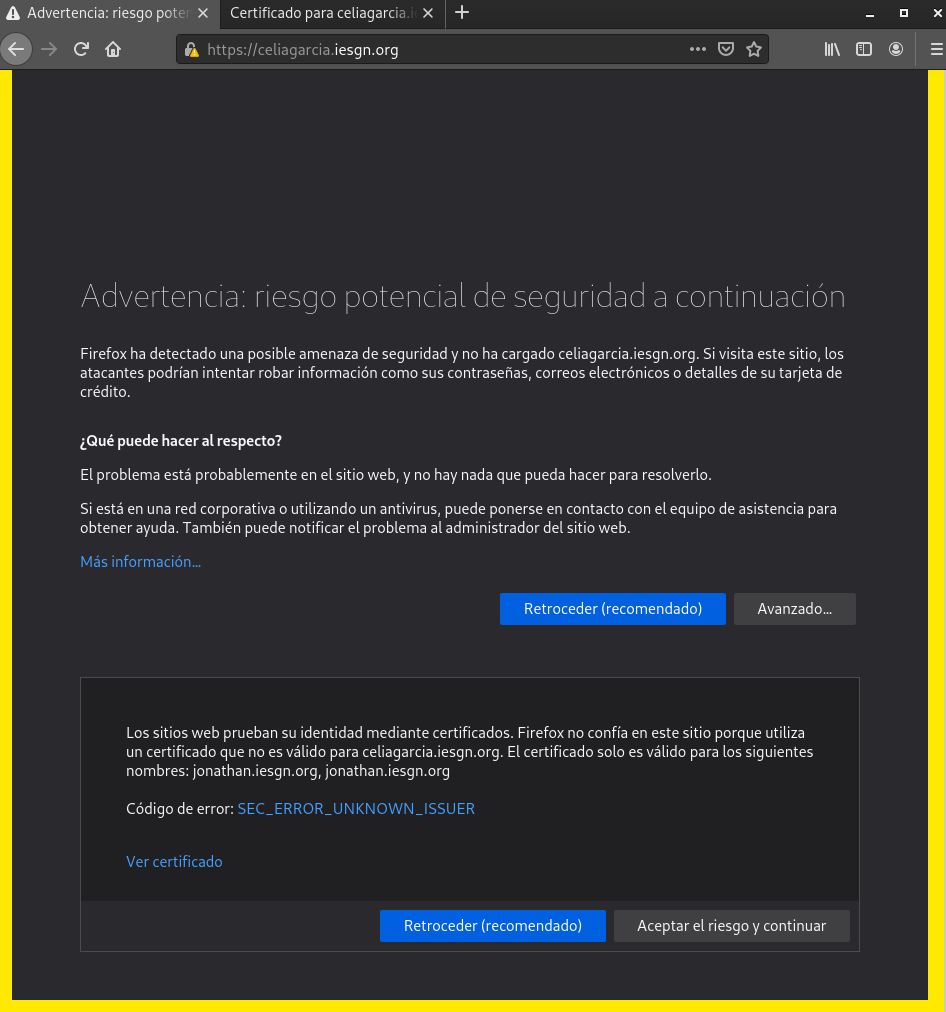
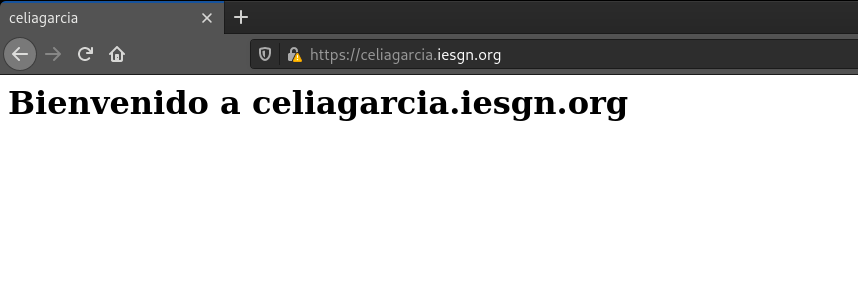
Vamos a nuestro navegador y accedemos a https://celiagarcia.iesgn.org
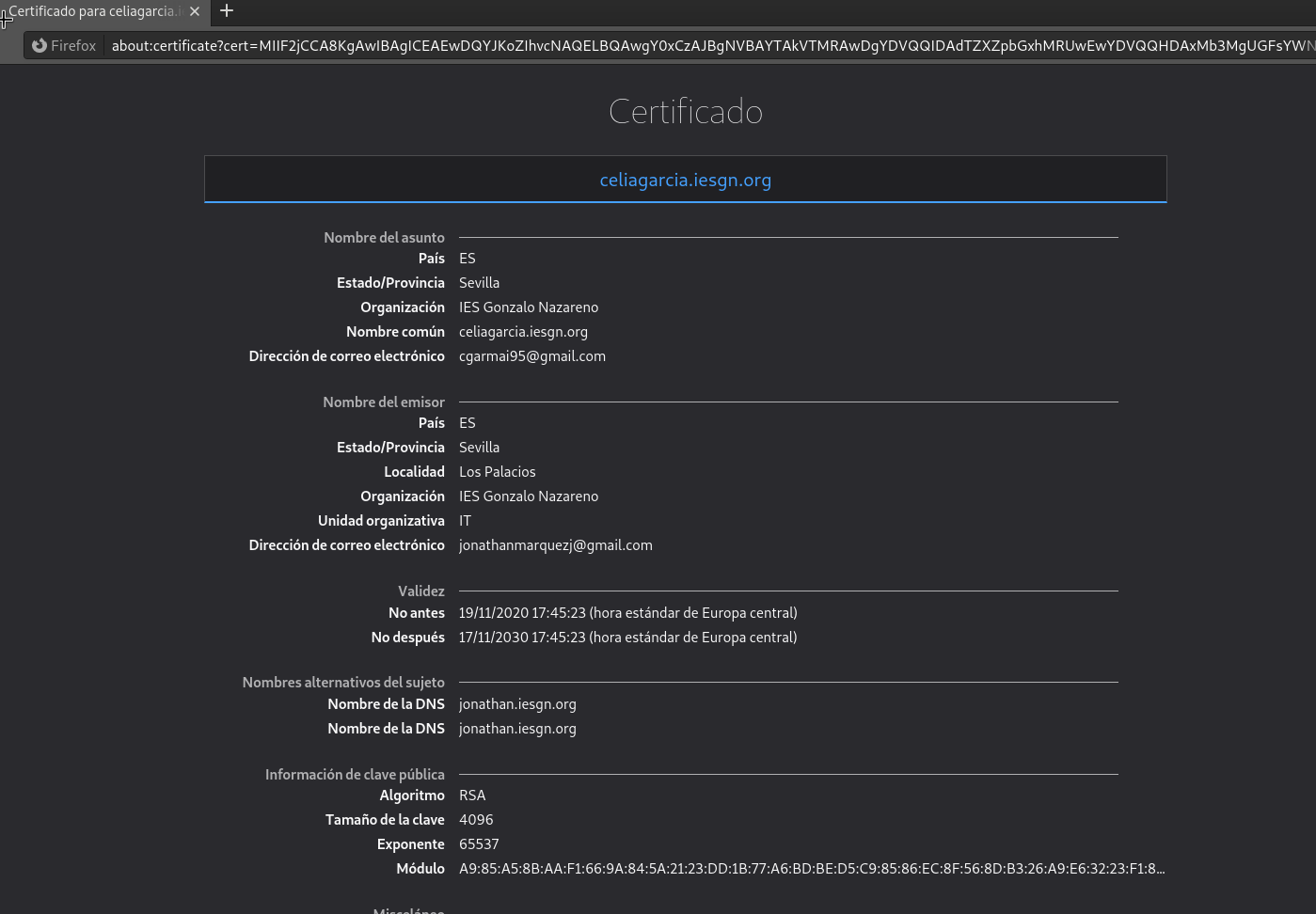
Comprobamos que podemos acceder, nos notificará que no es una conexión segura ya que no se conoce la entidad certificadora pero añadimos una excepción. Y vemos el certificado en el que aparece la firma de la entidad certificadora de nuestro compañero.